



Bosch · Hikvision · Digital Watchdog · IC Realtime · Meraki

Commercial Security Camera Installation in New Jersey

Business surveillance designed and secured by an MSP — for offices, warehouses, manufacturing, retail, schools, dealerships, and multi-site operations across Northern NJ and the New York metro area.

25+ years installing and securing business camera systems for Northern NJ and NY metro operators.
25+ Years
Securing NJ Businesses
2 States
NJ · NY Coverage
MSP-Secured
VLAN · Hardened · Monitored
Free
On-Site Survey & Quote

What is a commercial security camera system?

A commercial security camera system is a business-grade surveillance platform combining IP cameras (PoE or wireless), a video management system (VMS) or NVR, secure storage, and remote viewing — engineered for continuous operation, evidentiary-quality footage, and integration with your business network. On-Site Technology designs, installs, and cybersecurity-hardens camera systems for Northern NJ and NY metro businesses using Bosch, Hikvision, Digital Watchdog, IC Realtime, and Cisco Meraki — including VLAN segmentation, secure remote access, retention planning, and ongoing managed support.


The OST Difference

Why businesses choose OST over a generic camera installer

Most security camera companies install hardware. We are an IT and cybersecurity firm that happens to install cameras, which means your surveillance system is treated as a business-critical, network-connected asset. Not a box on the wall.

Cybersecurity-Hardened by Default

Cameras live on a segmented VLAN, default credentials are replaced, firmware is patched on schedule, and remote access goes through controlled channels. Not public internet exposures that get botted in days.

Network & Storage Engineered Together

PoE switching, bandwidth planning, NVR or cloud retention, off-site backup of critical clips, and uptime that survives a switch reboot. Your network and your cameras are designed as one system.

Multi-Site & Multi-Tenant Ready

Centralized VMS, role-based access, consistent policies, and a single pane of glass across every location. From a Bergen County warehouse to a Manhattan satellite office.

Brand-Neutral by Design

We deploy Bosch, Hikvision, Digital Watchdog, IC Realtime, and Cisco Meraki, chosen per use case, not per vendor commission. The right tool for warehouse perimeter is not the right tool for a tenant lobby.

Ongoing Support, Not Install-and-Disappear

Health checks, firmware patching, storage monitoring, lens cleanings, and rapid on-site response. The same MSP discipline we apply to your servers, applied to your cameras.

Compliance-Aware Deployments

Retention policies, access logging, signage, and chain-of-custody for footage that may be requested by law enforcement, insurance, OSHA, or HR investigations. Built right the first time.


Industries

Six environments. Six different threat models.

Every commercial environment has a different risk profile. Our designs match the camera type, placement, retention, and analytics to how your business actually operates.

Industrial & Logistics

Warehouses & Distribution

Loading docks, perimeter fencing, ANPR for inbound and outbound trucks, after-hours intrusion detection, dock-door event tagging, and hi-rack aisle coverage. Built to support inventory shrink, freight disputes, and OSHA evidence requests.

Commercial Real Estate

Offices & Multi-Tenant

Lobbies, elevator vestibules, server rooms, parking decks, and tenant common areas. Discreet camera selection, integration with access control, and footage retention sized for tenant agreements and HR investigation timelines.

Education & Nonprofit

Schools & Nonprofits

Building perimeter, hallways, entry vestibules, parking lots, and outdoor athletic facilities. Visitor management integration, lockdown event capture, and access policies that meet board-of-education and grant-funder expectations.

Public Sector

Municipal & Public-Facing

Town halls, courts, public works yards, water and utility facilities, and community centers. Designed with public-records considerations, signage compliance, retention policy controls, and segregated viewing roles for multiple departments.

Retail & Hospitality

Retail & Storefront

Loss prevention, POS-overhead coverage, people-counting analytics for staffing and conversion, queue analytics, and parking-lot incident capture. Designed to support insurance claims and law-enforcement evidence requests.

Automotive

Auto Dealerships & Fleet Yards

Lot coverage, ANPR for inventory and customer vehicles, after-hours theft and key-fob staging detection, service-bay damage capture, and integration with dealership management workflows. A perennial high-risk vertical for theft and damage disputes.


What’s Included in Every Installation

A turnkey deployment from first walk-through to ongoing support — no surprise line items, no hand-offs to a separate network team, no orphaned cameras six months later.

On-Site Assessment & Camera Plan

Walk-through, line-of-sight analysis, lighting and weather considerations, blind-spot mapping, and a written camera plan with model selection and mounting specs.

Network Design & PoE Infrastructure

Managed PoE switching sized for total wattage and uplink, dedicated camera VLAN, IP addressing, and bandwidth planning so your surveillance traffic never competes with business workloads.

Cabling, Mounting & Installation

Plenum-rated Cat6 runs, weather-rated outdoor enclosures, lift work and conduit where required, and clean cable management at the IDF/MDF. Permitted and inspected where local code requires.

VMS / NVR Configuration & Storage

NVR or VMS sized for camera count, resolution, frame rate, and retention target. RAID-protected on-prem storage, optional cloud retention, and verified failover from a power blip.

Secure Remote Access & Mobile

Remote viewing through hardened gateways — not exposed RTSP ports. Mobile apps for iOS and Android, role-based access for managers, supervisors, and after-hours responders.

Training, Documentation & Support

On-site training for your team, written admin runbook, footage-export procedures, and a managed support plan with health checks, firmware updates, and on-site response.


Camera Technology Decisions That Matter

A short field guide so you walk into your site survey knowing what to ask — and what the trade-offs really are.

PoE (Power over Ethernet) vs. Wireless

PoE wins for commercial. One cable for power and data, deterministic bandwidth, no WiFi interference, and the camera reboots when the switch port reboots — predictable, supportable, hardened.

Wireless is acceptable for temporary deployments, construction sites, or single cameras where running cable is impractical — never as a default for a permanent business install.

NVR (On-Prem) vs. Cloud Storage

Most businesses run hybrid. NVR for primary 30–90 day retention with RAID protection, plus cloud for selective long-term retention of critical clips and off-site backup of the last 7–14 days for ransomware resilience.

Pure-cloud only makes sense for very small deployments or true multi-site where local storage isn’t practical. Bandwidth and per-camera subscription costs add up fast.

Dome vs. Bullet vs. Turret

Dome: discreet, vandal-resistant, hard to tell which way it’s pointed — good for lobbies and ceilings. Bullet: obvious, long range, deterrent value — good for parking lots and perimeters. Turret: the modern compromise — great IR performance, no dome glare, easy to aim. We default to turret for most outdoor commercial use.

Resolution & Retention Sizing

4MP is the new baseline for general business surveillance. 8MP (4K) is appropriate for license plates, large open areas, and forensic-quality coverage — but doubles storage and bandwidth.

Standard retention is 30 days; 60–90 days is common for retail and warehouse; some regulated environments require 12 months. We size storage for your actual policy, not a generic guess.


AI Analytics — Framed by Business Outcome

Modern cameras include heavy AI capabilities. We deploy them deliberately, with documented use cases, retention limits, signage where required, and access controls — not as flashy bullets on a brochure.

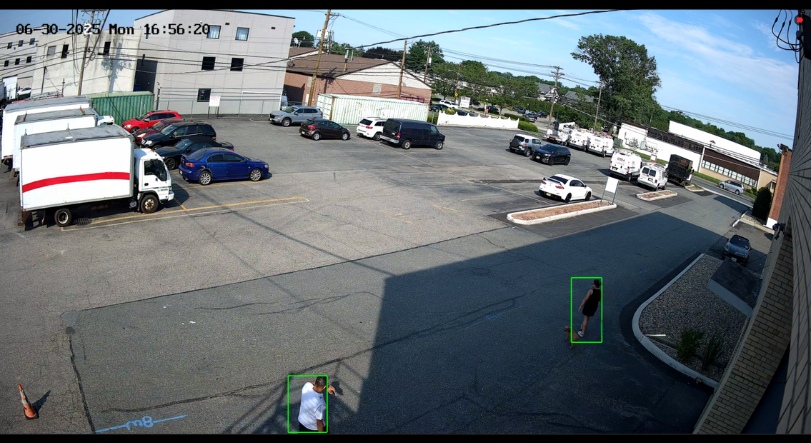
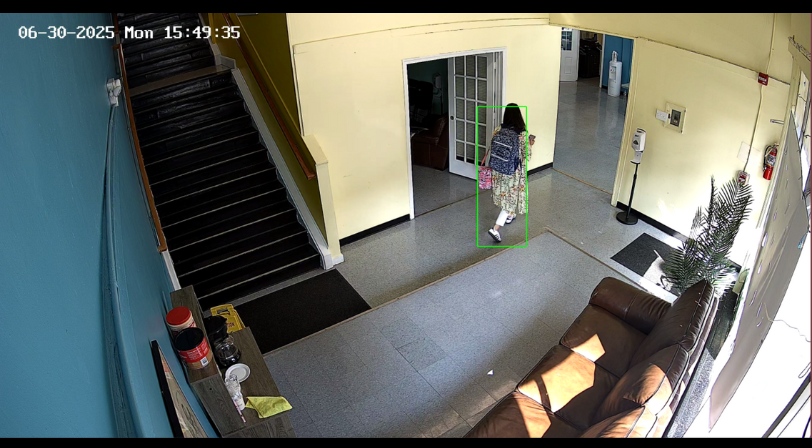
What it actually looks like — live from deployed systems

AI license plate and person detection in commercial parking lot

License Plate & Person Capture — Parking Lot

ANPR plus person classification flagging vehicles and individuals at a commercial property entry.

Real-time AI person detection in interior corridor with bounding boxes

Real-Time Person Detection — Interior Corridor

Bounding-box person detection drives after-hours intrusion alerts — not motion-on-leaves.

License Plate (ANPR)

Inbound/outbound truck logs at warehouses, customer-vehicle tracking at dealerships, after-hours alerting on parking lots, and chain-of-custody for theft investigations.

Person & Vehicle Classification

Filters out raccoons, blowing leaves, and headlights so after-hours alerts mean something. Cuts false-alarm fatigue dramatically — the #1 reason traditional motion alerts get ignored.

Line-Crossing & Intrusion Zones

Virtual fences around docks, fenced lots, restricted server rooms, and restricted hallways. Triggers real-time alerts to mobile or to a monitoring service — not a buried log entry.

People Counting

Retail conversion analytics, occupancy management for offices and event spaces, and queue-length monitoring to drive staffing decisions. Aggregate numbers, not individual tracking.

AI Search & Forensic Review

Search hours of footage in seconds: “show me every red car between 2am and 4am” or “every person in a yellow jacket near the loading dock yesterday.” Investigations that took days now take minutes.

Tampering & Health Alerts

Camera lens spray-painted, cable cut, view obstructed, or the camera goes offline — you get an alert immediately, not when you go to pull footage after an incident.

A note on facial recognition: we do not deploy facial-recognition analytics by default. Where a customer has a documented business case (high-value asset protection, a known-threat watchlist, etc.), we deploy it with explicit policy, signage where required by jurisdiction, retention limits, and segregated access — not as a checkbox feature.


Cybersecurity Hardening for Surveillance Systems

Internet-connected cameras are some of the most-targeted devices on a business network. Every OST install includes the hardening that generic camera companies don’t do.

1

VLAN segmentation & firewall rules

Cameras live on a dedicated VLAN with explicit firewall rules — isolated from your business LAN, accounting workstations, and production servers. A compromised camera cannot pivot into your business network.

2

Default credentials replaced & password vaulted

Every camera, switch, and NVR gets unique, complex credentials stored in our managed password vault — never the manufacturer default that’s published in every botnet’s wordlist.

3

Firmware patching on a schedule

Camera and VMS firmware is reviewed quarterly against vendor advisories and CISA bulletins, then applied in a controlled change window. Most camera breaches happen on firmware that’s been vulnerable for over a year.

4

Secure remote access — no exposed ports

Remote viewing goes through a hardened gateway with MFA, role-based permissions, and full session logging — not an RTSP or web port forwarded to the public internet, which is how 90% of consumer-grade installs get pwned.

5

Logging, alerting & backup of footage

Camera, NVR, and access events flow into our monitoring stack. Critical footage is backed up off-site so a ransomware attack on your NVR doesn’t also destroy the only evidence of the attack.


Camera Brands & Platforms We Deploy

Brand-neutral by design. We choose the platform that fits your environment, scale, integration needs, and budget — and we’ll explain the trade-offs in plain English.

Bosch

German-engineered enterprise cameras with industry-leading low-light, advanced built-in analytics, and exceptional longevity. Our pick for high-stakes 24/7 critical environments.

Hikvision

Broad commercial line with strong AI analytics, ANPR options, and cost-effective high-resolution coverage. Strong fit for warehouse and dealership perimeters where camera count is high.

Digital Watchdog

US-headquartered, contractor-friendly platform with excellent VMS (Spectrum) and strong support. Our default for commercial installs that prioritize US-supplier sourcing.

IC Realtime

Strong commercial price-to-performance with cloud-based AI search (Ella) and reliable ONVIF compatibility. Often selected for retail and SMB deployments where TCO matters.

Cisco Meraki

Cloud-managed cameras with onboard storage and zero on-prem NVR. Our pick for multi-site businesses that already run Meraki networking and want a single pane of glass.


What Drives the Cost of a Commercial Camera System

Camera hardware is rarely the biggest line item. Here’s the honest breakdown of what moves a quote up or down — so you can scope realistically.

1. Camera count & coverage

A small office might need 6–10 cameras; a warehouse with multiple loading docks easily needs 30–60. Coverage drives every other line item.

2. Indoor vs. outdoor & lighting

Outdoor cameras need weather-rated enclosures, longer cable runs, conduit, and often supplemental IR. Low-light or dark-lot environments push you to higher-spec sensors.

3. Cabling, conduit & lift work

Often the largest single cost. High ceilings need scissor lifts; outdoor runs need conduit and trenching; older buildings need fishing through finished walls. We always quote labor honestly — no surprise change orders.

4. Resolution, frame rate & retention

4K at 30fps for 90 days is roughly 4× the storage footprint of 1080p at 15fps for 30 days. Storage scales linearly with all three. Right-sizing here saves real money.

5. AI analytics tier

Basic motion is included. ANPR, advanced AI search, and cloud-based forensic search are typically per-camera or per-site licenses on top.

6. Multi-site & centralized VMS

A single VMS spanning multiple buildings or sites adds licensing and design complexity, but pays back in operations and consistent policies across locations.

7. Network & infrastructure upgrades

If your switching, UPS, or rack space won’t support the new camera load, we’ll scope the upgrades transparently rather than overload existing equipment.

8. Ongoing managed support

Monthly or annual support plans cover firmware updates, health monitoring, lens cleanings, and on-site response. Not required, but the difference between a system that lasts 7+ years and one you’re replacing in 3.


For Larger Footprints

Supplement Fixed Cameras with Drones for Active Perimeter Coverage

College campuses, large parking structures, sprawling industrial properties, and operations with dedicated security personnel can use drones as a force multiplier — allowing security staff or auditors to canvas the perimeter, respond to a triggered intrusion alert with overhead visibility, or cover blind spots that fixed cameras can’t physically reach. We integrate drone capability with your fixed-camera system and your security team’s workflow — one vendor, one accountability chain.

Explore Our Drone Services →


Commercial Camera Installation Areas We Serve

Headquartered in Clifton, NJ. We install and support commercial camera systems across Northern New Jersey and the broader New York metro area.

Northern New Jersey (Primary)

Counties: Bergen, Passaic, Essex, Hudson, Morris, Union, Sussex, Warren.
Cities: Clifton, Paterson, Newark, Jersey City, Hoboken, Hackensack, Paramus, Wayne, Montclair, Morristown, Parsippany, Bloomfield, Passaic, Lyndhurst, Nutley, West Orange, Livingston, Ridgewood, Elizabeth.

New York Metro

NYC five boroughs: Manhattan, Brooklyn, Queens, the Bronx, and Staten Island.
Lower Hudson & LI: Westchester, Rockland, and Long Island. On-site service across the broader NY metro corridor.


Our Installation Process

A documented five-step process from first conversation to ongoing support. No black boxes, no surprises.

1

Free On-Site Survey

A site walk-through to understand your goals, threat model, building constraints, and existing network. You leave with a written summary — not a generic brochure.

2

System Design & Quote

A camera-by-camera plan with model selections, mounting locations, network design, storage sizing, and a transparent quote. No verbal estimates — everything in writing.

3

Professional Installation

Our certified technicians handle cabling, mounting, configuration, network integration, and hardening. Work is permitted, inspected, and code-compliant where required.

4

Verification, Training & Hand-Off

Every camera is verified for coverage and image quality, your team is trained on live and recorded views, and you receive an admin runbook documenting every credential, IP, and policy.

5

Ongoing Managed Support

Optional support plan: firmware updates, health monitoring, lens cleanings, storage capacity reviews, footage-export assistance, and on-site response when something needs hands.


Frequently Asked Questions

Twelve questions our prospective business clients most commonly ask before booking a site survey.

What is the best security camera system for a small business?

For most small commercial deployments (10–30 cameras), a PoE IP camera system from Digital Watchdog, Hikvision, or IC Realtime paired with an on-prem NVR delivers the best balance of cost, image quality, and longevity. The right specific brand depends on your environment, lighting, retention requirements, and whether you need cloud or multi-site management. We’ll recommend the best fit during your free site survey.

How many security cameras does a typical business need?

A small office of 2,000–5,000 sq ft typically needs 6–12 cameras (entries, lobby, common areas, parking). A warehouse with multiple loading docks easily needs 30–60. A retail storefront usually runs 8–20 (entrances, POS, sales floor, stockroom, parking). The honest answer comes from a site walk-through, not a generic count.

Should my business use cloud storage or an on-premise NVR?

Most businesses are best served by a hybrid: an on-prem NVR for primary 30–90 day retention with RAID protection, plus cloud for selective long-term clip retention and off-site backup of critical recent footage. Pure cloud is bandwidth-intensive and per-camera subscription costs add up. Pure on-prem leaves you exposed to ransomware destroying both your network and your only evidence of the attack.

Can security cameras be segmented from my main business network?

Yes — and they should be. Every OST install puts cameras on a dedicated VLAN with explicit firewall rules so they cannot reach (or be reached from) your business LAN, accounting workstations, or production servers. A compromised camera should never be a path into your business systems. Most generic camera installers do not do this.

Do you install wired PoE camera systems?

Yes — PoE is our default for commercial installs. One cable for power and data, deterministic bandwidth, no WiFi interference, and predictable behavior. Wireless is reserved for genuinely impractical cabling situations like temporary deployments, construction sites, or single cameras on outbuildings.

Can you integrate cameras with access control or alarm systems?

Yes. Common integrations include access control (badge-in event triggers a recorded clip), intrusion alarms (alarm event auto-pulls relevant camera views), and door entry intercoms. We integrate at the VMS level when supported, or at the network/relay level when needed. We also build mobile alerting into the workflow.

Do you serve businesses in Clifton and northern New Jersey?

Yes. Clifton is our headquarters and we install commercial camera systems across Bergen, Passaic, Essex, Hudson, Morris, Union, Sussex, and Warren counties on a regular basis. Same-day site surveys are typically available for accounts in Northern NJ.

Do you provide ongoing support and maintenance after installation?

Yes. Our managed support plans cover firmware updates, system health monitoring, storage capacity reviews, lens cleanings, footage-export assistance, and prioritized on-site response. Cameras are network-connected devices — they need the same maintenance discipline as your servers and switches, and we apply it.

Can your camera systems detect license plates (ANPR)?

Yes. We deploy purpose-built license-plate (ANPR) cameras for warehouse loading docks, dealership lots, parking lot entries, and gated facilities. ANPR requires the right camera model, the right placement, the right lighting, and the right analytics license — not just turning a feature on. We design for actual capture rate, not the marketing claim.

How long does footage need to be kept?

Standard commercial retention is 30 days; retail and warehouse commonly run 60–90 days; some regulated environments (healthcare, financial, public sector) may require 6–12 months. Your retention policy directly drives storage sizing and cost. We help you pick a defensible retention period and document it for auditors and insurers.

How long does a typical commercial camera installation take?

A small 8–12 camera office install typically completes in 1–3 days from kickoff. A warehouse or multi-building install with 40+ cameras, lift work, and conduit can run 2–4 weeks. Phased installs are common for occupied sites — we work around your operations, not the other way around.

What does a free site survey actually include?

A site walk-through (typically 60–90 minutes), discussion of your goals and threat model, a review of your existing network and any current cameras, identification of likely camera placements and challenges, and a written follow-up summary with recommended approach. No obligation, no high-pressure sales pitch.


Get a Free Commercial Camera Site Survey

A quick walk-through, an honest scoping conversation, and a written recommendation. No obligation, no high-pressure pitch — just a clear path to a system that actually fits your business.

Headquartered in Clifton, NJ · Serving Northern NJ and the NY metro since 2001


Request Your Free Site Survey

Tell us about your site and what you’re trying to protect. We’ll respond within one business day to schedule a walk-through.

    Your Name (required)

    Your Email (required)

    Subject

    What does your team need help with?

    Prefer to talk now? Call (973) 777-7227 · Mon–Fri 8am–6pm ET